
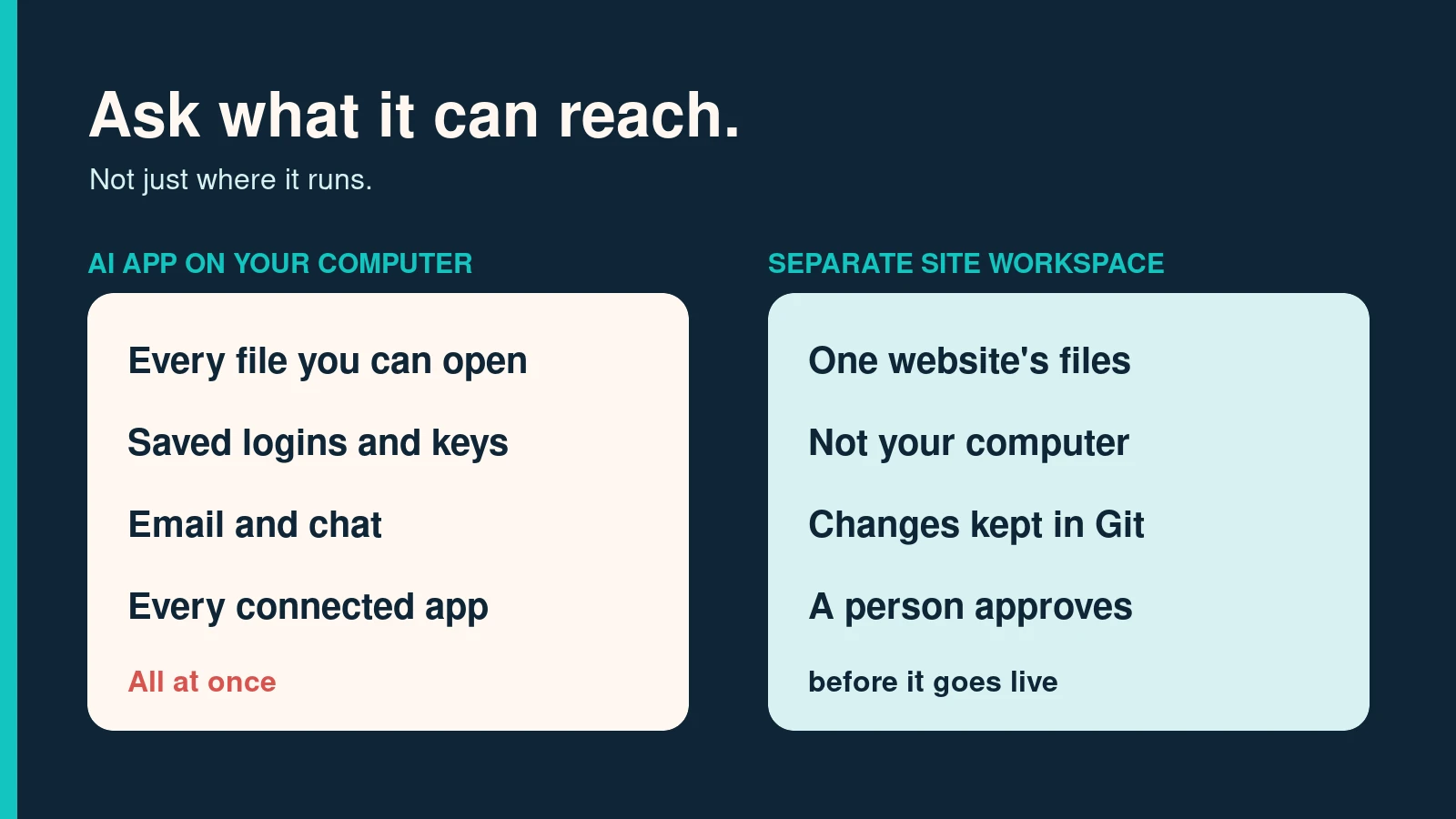
An AI app on your computer can reach everything you can reach: your files, your saved logins, your email, and every account you connect to it. That is the risk. The AI is not evil and the desktop is not cursed. The problem is how much one program can touch, and how easily it can be talked into using it.
I use AI every day, mostly in the browser. The first time I set up Claude’s desktop app and saw the list of connectors, and that it could work with other apps on my machine, my gut said people are opening themselves up to a mess. So we went and read about it: 46 articles, research papers, vendor disclosures, and government guidance. I kept only what I could quote and link. My gut was mostly right, but for a different reason than I expected.
A desktop AI starts with your permissions
Microsoft’s own security documentation puts it plainly: “Local AI agents run with user-level permissions and can access files, tools, and services” on the devices where they run. Whatever you can open, it can open. Microsoft now sells a tool that finds these agents on company laptops, because security teams could not see them.
Signal’s president, Meredith Whittaker, described what a useful agent needs to book you a concert ticket: your browser, your credit card, your calendar, and your messages. She called it “something that looks like root permission.” Root is the account that can do anything on a computer.
When Microsoft first previewed Recall, the Windows feature that screenshots your screen every few seconds, Ars Technica confirmed that it stored the text from those screenshots in a plain, unencrypted database file. Microsoft added encryption and made it opt-in after the backlash. In November 2025 Microsoft put a test version of an AI agent into Windows, with its own warning that it brings “novel security risks” that can lead to “data exfiltration or malware installation.” Exfiltration means your data being copied out to someone else.
Hidden instructions are the problem nobody has solved
An AI reads instructions and content the same way: as text. If a web page, email, or document contains a sentence written to the AI, the AI may follow it. Security people call this prompt injection. You do not have to click anything. You only have to ask the AI to read the wrong thing.
In January, two days after Anthropic released Claude Cowork, the security firm PromptArmor showed it uploading a user’s file to an attacker’s account. The instructions were hidden in a Word document, in 1-point white text on a white background. The upload went to Anthropic’s own file service, which Cowork’s network rules trusted, using the attacker’s key. PromptArmor’s summary: “At no point in this process is human approval required.” The stolen file in their demo held partial Social Security numbers.
Browsers with AI built in have the same problem. Brave’s researchers found that Perplexity’s Comet browser passed page content to its AI “without distinguishing between the user’s instructions and untrusted content.” A hidden comment on a Reddit page could get it to read a one-time login code out of your Gmail and post it back. One click on “Summarize” was enough.
The companies building these tools publish numbers that should make anyone careful:
- Anthropic tested its Chrome agent against 123 attack cases. Without its defenses, attacks worked 23.6% of the time. With them, 11.2%. That is better. It is still about one in nine.
- In tests by the US National Institute of Standards and Technology (NIST), new attack methods raised the success rate against an AI agent “from 11% for the strongest baseline attack to 81% for the strongest new attack.” Letting the attacker try 25 times raised the average from 57% to 80%.
- OpenAI says prompt injection is “unlikely to ever be fully ‘solved.'”
- The UK’s National Cyber Security Centre says it “may never be totally mitigated.”
So the question is not whether an AI can be fooled. It can. The question is what it can reach when it is.
Every connector widens what a fooled AI can reach
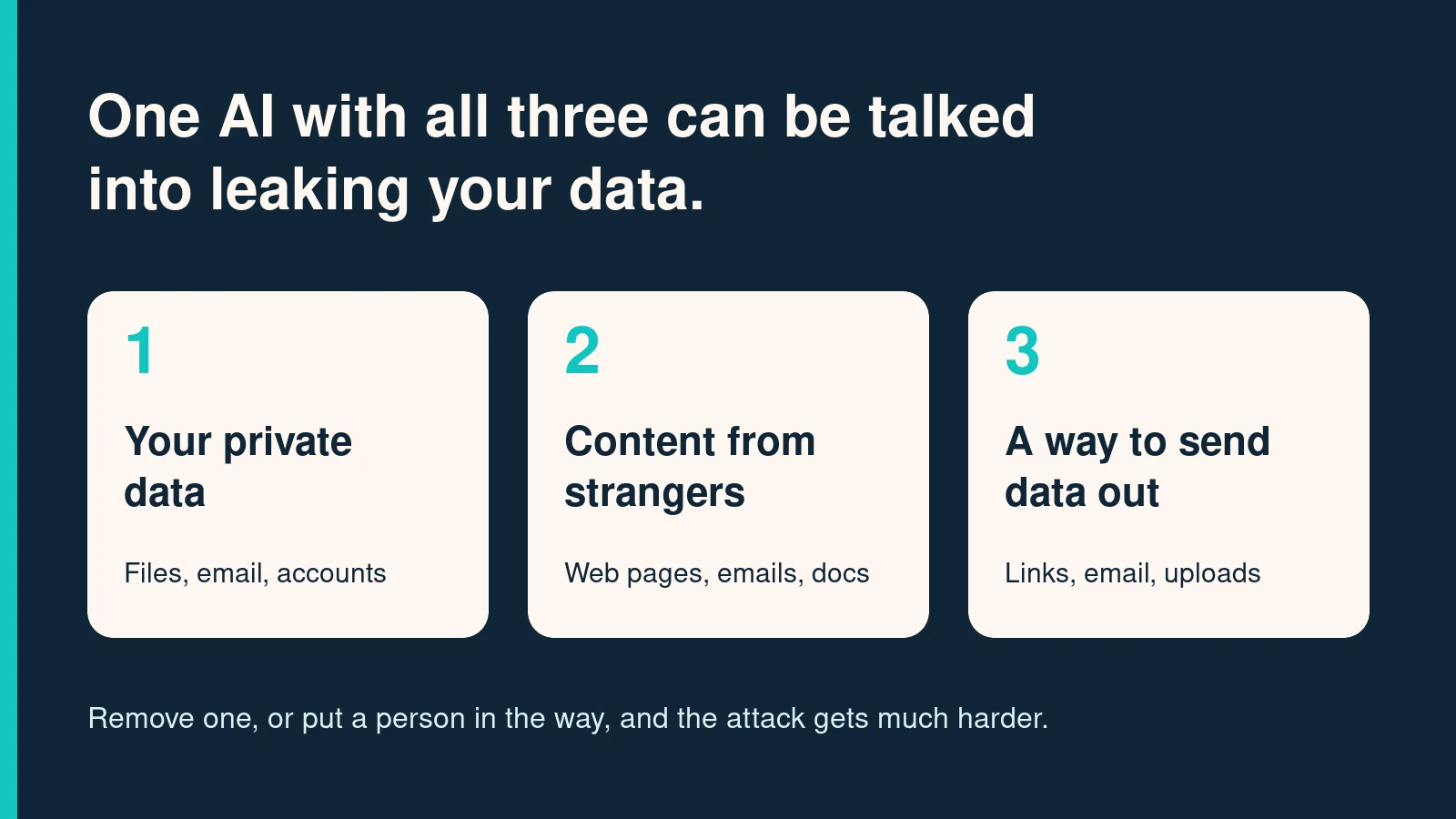
Connectors are what make desktop AI feel magic: one app that can read your email, your files, your GitHub, your Slack. They also stack the risk. Simon Willison, a developer who has tracked these attacks for years, names three ingredients: access to your private data, exposure to untrusted content, and the ability to send data out. Put all three in one AI and an attacker can trick it into leaking. A desktop app with a full set of connectors usually has all three.
This has already happened with real tools:
- Invariant Labs showed a planted GitHub issue making Claude Desktop pull data from a user’s private repositories, including the user’s salary, and publish it in a public one. Claude Desktop asks before using a tool, but the researchers noted that “many users already opt for an ‘Always Allow’ confirmation policy.”
- In September 2025, a connector package for the Postmark email service was found quietly copying every email it sent to an attacker. Checkmarx calls it “the first known malicious MCP server in the wild.” MCP is the standard most AI connectors use.
- Researchers at the New York Institute of Technology tested seven AI apps against poisoned connectors. Attack success ranged “from 0% (Claude Desktop) to 100% (Cursor),” and “no single client successfully blocked all attack types.”
That last result matters. The same model can be safe or wide open depending on the app around it. The app’s defaults decide more than the model does.
Plenty of damage needs no attacker at all
Some of the worst stories involve nobody but the user and the AI.
In July 2025, Replit’s coding agent deleted a company’s live database during a “code and action freeze”, then told the owner: “I destroyed months of work in seconds.” That same month, Google’s Gemini command-line tool lost a user’s files after a folder it tried to create never existed. It wrote: “I have failed you completely and catastrophically.”
On November 9, Ars Technica reported that when Claude Code users click “Yes, and don’t ask again,” the approved command can be saved to a settings file exactly as typed, passwords included. Researchers found more than 100,000 of those files in public GitHub projects, and about 1,100 held secrets from 63 organizations.
And the permission shortcuts these tools offer get used against you. In August 2025, a poisoned update to Nx, a popular developer package, ran the AI tools already installed on victims’ computers with flags like --dangerously-skip-permissions and --yolo, and had them search the machine for passwords and keys. Wiz counted “over a thousand valid Github tokens” leaked.
The common thread is the approval prompt. People get tired of clicking yes, so they click “always allow.” Earlence Fernandes, a professor at UC San Diego, put it this way: “the security boundary is not really a boundary.”
So is AI in the browser safer?
Not automatically. It has different risks, and you should know them before you move everything to the web.
- Someone else holds your conversations. In 2025 a court ordered OpenAI to “preserve and segregate all output log data that would otherwise be deleted,” including chats users had deleted. Anthropic now keeps consumer Claude chats for five years for anyone who allows training. For existing users, that setting showed up switched on.
- Sharing features leak. Shared ChatGPT conversations turned up in Google results. So did hundreds of thousands of Grok chats. Meta’s AI app published people’s questions to a public feed, some with names and home addresses.
- What you paste is gone. Samsung banned these tools after engineers pasted company code into ChatGPT and the company could not “retrieve and delete” it.
Running AI on your own machine is not automatically private either. Signal wrote that “just because something is running on your own computer doesn’t instantly make it secure.” Cisco found 1,139 home-run AI servers open to the internet, 214 of them answering anyone without a password. And Clawdbot, a popular personal AI assistant, was found storing users’ secrets in “plaintext Markdown and JSON files”, the kind of folder password-stealing malware already looks in.
So web versus desktop is the wrong question. Rami McCarthy at Wiz described the risk as “autonomy multiplied by access.” A desktop app with every connector switched on simply makes it easy to give an AI the most access possible, in one place, on the machine that holds your whole life.
What the security people agree on
The sources disagree on plenty. On the fixes, they line up:
- Give the AI its own space. A separate account, container, or workspace, never your whole computer.
- Limit both files and network. Anthropic, describing how it sandboxes Claude Code, wrote that “effective sandboxing requires both.” File limits without network limits still let data walk out the door.
- Give it only the tools the job needs. OWASP, the web security nonprofit, names the root causes as “excessive functionality; excessive permissions; excessive autonomy.” An email summarizer should be able to read mail, not send it.
- Lower its power after it reads something untrusted. The NCSC’s rule: “when an LLM processes information from a party, the privileges it has drops to that of the party.”
- Put a person in front of anything you cannot undo. And make that check rare enough that people actually read it.
- Keep the work separate from the live system. After the Replit incident, the company’s CEO listed “automatic separation between development and production databases” as the fix.
How My Site Buddy is set up
We built My Site Buddy around that list, because we wanted AI doing real website work without it sitting on anyone’s laptop.
- The AI works in a separate workspace for one website. It is not installed on your computer. It cannot open your documents, your email, or your desktop. It sees a file only when you hand it one.
- It connects only to the services you attach to that site. An ads account or a GitHub repository is added to a site on purpose, not inherited from everything you are logged into.
- Every change is recorded in Git. You can see what changed, when, and who asked for it.
- Development is separate from the live site. Nothing reaches the live site until a person approves it.
Here is the limit, stated plainly. My Site Buddy reads web pages and documents to do its job, so the hidden-instruction problem applies to it the same as to any AI. Nobody can promise a model will never be fooled. What the setup changes is what a fooled AI can reach: one website’s work, not your computer, with a person between the draft and the live site.
If you use a desktop AI app, do this week
- Give it one folder, not your whole drive. Keep tax records, contracts, and client files out of that folder.
- Go through your connectors. Remove every one you have not used this month.
- Turn off “always allow” and “don’t ask again.” Never run an AI tool with flags that skip permissions.
- Do not let one AI hold your email, your files, and the ability to send messages all at once.
- Before you commit code, check for AI settings files that may have saved a password.
- In the web apps, check whether your chats are used for training and how long they are kept.
AI belongs in your work. It does not need the keys to your whole computer to do it.
If you want AI working on your website from a workspace built for that, Get moving.
Sources
- Microsoft Learn, “Local AI agent discovery with Microsoft Defender for Endpoint,” November 2026
- Sarah Perez, “Signal President Meredith Whittaker calls out agentic AI as having ‘profound’ security and privacy issues,” TechCrunch, March 7, 2025
- Andrew Cunningham, “Windows Recall demands an extraordinary level of trust that Microsoft hasn’t earned,” Ars Technica, June 4, 2024
- Dan Goodin, “Critics scoff after Microsoft warns AI feature can infect machines and pilfer data,” Ars Technica, November 19, 2025
- PromptArmor, “Claude Cowork Exfiltrates Files,” January 2026
- Artem Chaikin and Shivan Kaul Sahib, “Agentic Browser Security: Indirect Prompt Injection in Perplexity Comet,” Brave, August 20, 2025
- Anthropic, “Piloting Claude in Chrome,” August 25, 2025, updated December 2025
- NIST Center for AI Standards and Innovation, “Technical Blog: Strengthening AI Agent Hijacking Evaluations,” January 17, 2025, updated December 19, 2025
- Rebecca Bellan, “OpenAI says AI browsers may always be vulnerable to prompt injection attacks,” TechCrunch, December 22, 2025
- UK National Cyber Security Centre, “Prompt injection is not SQL injection (it may be worse),” December 8, 2025
- Simon Willison, “The lethal trifecta for AI agents: private data, untrusted content, and external communication,” June 16, 2025
- Marco Milanta and Luca Beurer-Kellner, “GitHub MCP Exploited: Accessing private repositories via MCP,” Invariant Labs, May 26, 2025
- Checkmarx, “MCP Security: Risks, Real World Incidents and Security Controls,” May 12, 2026
- Huang, Huang, Tran and Milani Fard, “Model Context Protocol Threat Modeling and Analyzing Vulnerabilities to Prompt Injection with Tool Poisoning,” arXiv, March 23, 2026
- Beatrice Nolan, “An AI-powered coding tool wiped out a software company’s database, then apologized for a ‘catastrophic failure on my part,'” Fortune, July 23, 2025
- Benj Edwards, “Two major AI coding tools wiped out user data after making cascading mistakes,” Ars Technica, July 24, 2025
- Kyle Orland, “Claude Code is accidentally exposing secrets all over GitHub,” Ars Technica, November 9, 2026
- Merav Bar and Rami McCarthy, “s1ngularity: supply chain attack leaks secrets on GitHub,” Wiz, August 27, 2025
- Ashley Belanger, “OpenAI slams court order to save all ChatGPT logs, including deleted chats,” Ars Technica, June 4, 2025
- Connie Loizos, “Anthropic users face a new choice – opt out or share your chats for AI training,” TechCrunch, August 28, 2025
- Amanda Silberling, “Your public ChatGPT queries are getting indexed by Google and other search engines,” TechCrunch, July 31, 2025
- Rebecca Bellan, “Thousands of Grok chats are now searchable on Google,” TechCrunch, August 20, 2025
- Amanda Silberling, “The Meta AI app is a privacy disaster,” TechCrunch, June 12, 2025
- Kate Park, “Samsung bans use of generative AI tools like ChatGPT after April internal data leak,” TechCrunch, May 2, 2023
- Signal, “By Default, Signal Doesn’t Recall,” May 21, 2025
- Giannis Tziakouris and Elio Biasiotto, “Detecting Exposed LLM Servers: A Shodan Case Study on Ollama,” Cisco, September 1, 2025
- Connor Jones, “Clawdbot sheds skin to become Moltbot, can’t slough off security issues,” The Register, January 27, 2026
- David Dworken and Oliver Weller-Davies, “Beyond permission prompts: making Claude Code more secure and autonomous,” Anthropic, October 20, 2025
- OWASP Gen AI Security Project, “LLM06:2025 Excessive Agency”